Gesture-Controlled Media: A Python Experiment with MediaPipe
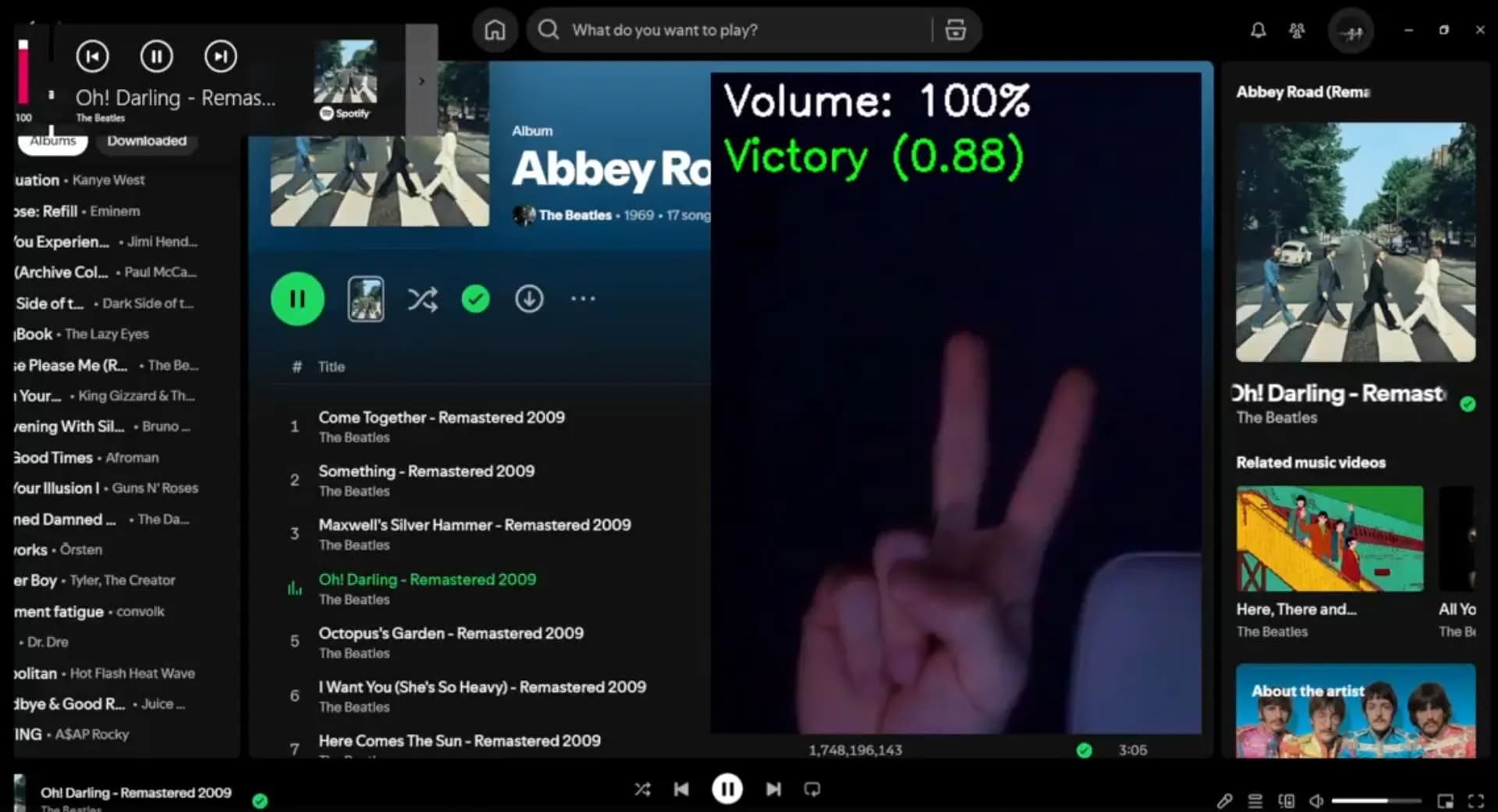
I found myself standing a lot—thinking, looking out the window, listening to questionable music—and every time I needed to skip a track, I had to walk back to my computer or find my phone. It was a minor annoyance, but one that felt solvable. We're in the age of AI, after all. Why couldn't I just make a hand gesture from across the room? That question turned into a Python project utilizing Google's MediaPipe library, and I've been using it daily for the past 3-4 weeks.
The Problem: Distance and Friction
The trigger for this project was simple: I stand up to think, I walk around, and I keep music playing while I do it. But when a song I don't like comes on—or worse, when I need to pause before leaving the room—I have to physically return to my desk or carry my phone everywhere. It's not a huge problem, but it's friction. And friction compounds over time.
The most useful gesture turned out to be the pause function. I can't count how many times I've stood up, forgotten to pause my music, and had to rush back before opening the door. Now I just throw up a closed fist as I'm walking away. Problem solved.
Why MediaPipe Made This Possible
Hand gesture recognition used to require training your own neural network or dealing with complex computer vision pipelines. Google's MediaPipe changed that by providing pre-trained models that just work. The gesture_recognizer.task model is a small file—under 10MB—that can identify multiple hand signals with high accuracy. It recognizes gestures like thumbs up, peace sign, closed fist, and the "I love you" sign without any custom training.
MediaPipe handles all the complexity: hand detection, landmark tracking, and gesture classification. I just feed it video frames and get back recognized gestures with confidence scores. That's the beauty of pre-trained models—they democratize complex AI functionality and let you focus on the application layer instead of the machine learning layer.
Technical Implementation
The script captures video from a webcam using OpenCV, converts each frame to MediaPipe's image format, and passes it to the gesture recognizer. The recognizer runs in VIDEO mode, which means it processes frames with temporal context for better accuracy. Each recognized gesture with a confidence score above 0.7 triggers a corresponding action.
Gesture Mappings
- →Closed_Fist: Play/Pause media playback
- →Pointing_Up: Skip to next track
- →Victory (peace sign): Go to previous track
- →Thumb_Up: Increase volume by 10%
- →Thumb_Down: Decrease volume by 10%
- →ILoveYou: Set volume to maximum
The script uses pynput to simulate media key presses (Key.media_play_pause, Key.media_next, Key.media_previous) which work system-wide across all media applications. Volume control required platform-specific implementations: osascript for macOS, pulsectl for Linux with PulseAudio, and pycaw for Windows. Each platform has different APIs for audio control, so the script detects the operating system using Python's platform module and calls the appropriate functions.
Gesture Cooldowns and UX Refinement
Early testing revealed a critical problem: gestures fire continuously. Hold up a thumbs up for two seconds and you'd hear skip-skip-skip-skip as it fired dozens of times. The solution was implementing a cooldown system. Each gesture (except volume controls) has a 2-second cooldown tracked in a dictionary mapping gesture names to timestamps. Once a gesture fires, it won't fire again until the cooldown expires.
Volume up and down are exempt from the cooldown because 2 seconds felt too sluggish for continuous volume adjustment. If you want to go from 20% to 60%, you don't want to wait 2 seconds between each 10% increment. This is one of those details you only discover through actual usage—what seems logical in theory doesn't always feel right in practice.
Range, Lighting, and Real-World Performance
I'm using a Logitech C270 webcam—the 720p model, nothing fancy—and performance varies dramatically with lighting. In good lighting conditions, I can trigger gestures from about 15 feet away. That's genuinely impressive. It means I can control YouTube playlists while folding laundry across the room. I had to spend the first day finding the optimal angle for both sitting and standing so that constantly adjusting the sensor didn't become an issue. Wish I had a lidar sensor on my Windows 10 desktop.
In low light at around 6 feet, the system still works but requires more deliberate hand placement. Having a black monitor in the background doesn't help—if there's no light, the camera has nothing to work with. That's just physics.
One quirk: sometimes the system thinks my face is a hand making gestures. It's rare but amusing when it happens. Another challenge is multiple hands—if two hands are visible, both need to make the gesture, or the "leading hand" (usually whichever entered the frame first) needs to make it. MediaPipe picks one hand to prioritize, which makes sense architecturally but feels slightly unpredictable from a user perspective.
Cross-Platform Development and Raspberry Pi Plans
I wanted this script to work on Windows, macOS, and Linux because I have different setups in different places. Windows works perfectly with standard webcams via OpenCV. The Raspberry Pi required special handling for the camera—the script includes a separate code path using picamera2 and libcamera that captures frames directly from the Pi's camera module. Volume control works on the Pi, but media key simulation doesn't without installing additional dependencies. I haven't tested the macOS implementation yet, but I included the osascript-based volume control code in case it works.
The Raspberry Pi implementation is still a work in progress—I ran into the usual WSL complications when testing on my Windows machine. But the bigger goal here is to install this on a Raspberry Pi that I'm planning to mount in my car as a media player, OBD reader, and general-purpose computer (to do things automatically while I am driving, likely related to sensors and cameras). Keep both hands on the wheel and your eyes on the road, seriously. Play movies only for your guests, because you can.
The Pi setup needs to handle power management carefully. When the car turns off, the OBD port stops responding, which the script can detect and trigger a graceful shutdown powered by a battery backup. The kit I bought includes a battery port and a 4.5-inch touchscreen, so the hardware pieces are coming together. The challenge is making it all work reliably in a vehicle environment with varying lighting conditions and vibration.
Energy Consumption and Trade-offs
Running continuous computer vision is computationally expensive. The script captures frames at whatever rate your camera supports, processes each frame through a neural network, and updates the display. On a laptop, you can hear the fans spin up. On a Raspberry Pi, it's even more noticeable.
This is the trade-off with AI-powered features: they deliver impressive results but at a cost. For a desktop setup where the computer is already running, it's negligible. For a battery-powered device like a car installation, it becomes a real consideration. I'm curious to measure actual power draw on the Pi and see if optimizations like reducing frame rate or lowering resolution can extend battery life without sacrificing usability.
What This Project Represents
This script is a glimpse into the future, built for fun. It's not revolutionary technology—gesture recognition has existed for years—but the accessibility of tools like MediaPipe makes projects like this trivial to build. A decade ago, implementing hand gesture recognition would have required a computer vision PhD. Today, it's a weekend project.
That's the pattern I keep seeing: AI and technological advancement tends to democratize once ultra-complex functionality. The barrier to entry drops, and suddenly individuals can build things that used to require research teams. The question becomes not whether you can build it, but whether it's worth building. In this case, the answer was yes—because I use it every single day.
Key Takeaways
- →Pre-trained AI models like MediaPipe make complex computer vision accessible
- →Small annoyances are worth solving—friction compounds over time
- →Gesture cooldowns prevent accidental repeated triggers and improve UX
- →Cross-platform development requires platform-specific code for system-level features like audio control
- →Real-world testing reveals problems you'd never anticipate in theory
- →Lighting conditions dramatically affect computer vision performance
- →AI-powered features trade computational cost for convenience
- →The best projects are the ones you actually use daily
Looking Forward
This project started as a solution to a personal annoyance and turned into a daily tool. It works well enough that I forget I'm using AI-powered gesture recognition—it just feels natural. That's the marker of good interaction design: when the technology fades into the background and you're left with the experience.
The Raspberry Pi car installation is the next evolution. Gesture-controlled media in a vehicle, combined with OBD diagnostics, GPS tracking, and maybe even live streaming capabilities. It's ambitious, but that's the point. The tools exist. The models are pre-trained. All that's left is building.
About the Author
Warren Chemerika is a web developer based in West Vancouver, BC, specializing in WordPress, React, and custom web solutions. Available for freelance projects and consulting.
Get in Touch