Check Your Website's Schema Markup
Validate your structured data and see which Google rich results you qualify for.
What is Google Rich Results Test?
Google Rich Results Test is a validation tool that checks your website's structured data (schema markup) and shows which enhanced search result features you're eligible for. It analyzes your HTML to detect schema.org markup and validates it against Google's requirements for rich results.
Article & Blog Posts
Validate Article schema for blog posts and news articles. Shows headline, image, author, and publish date in search results.
Local Business
Test Local Business schema for proper display of your business information, hours, location, and contact details in Google Search and Maps.
Product & E-commerce
Verify Product schema shows prices, availability, ratings, and reviews. Critical for online stores and product pages.
FAQ & HowTo
Check FAQ and HowTo schema for expandable Q&A sections and step-by-step instructions directly in search results.
Why Schema Markup Matters
- 30% higher click-through rates. Rich results with images, ratings, and enhanced formatting dramatically increase clicks from search results.
- Stand out in search results. Rich results take up more space and draw more attention than plain text listings, giving you a competitive edge.
- Proper schema = better SEO. Structured data helps Google understand your content, leading to better indexing, more accurate search results, and potential feature snippets.
- Catch errors before they hurt you. Invalid schema markup can prevent rich results from showing or cause Google to ignore your structured data entirely. Test early, test often.
What's My Score?
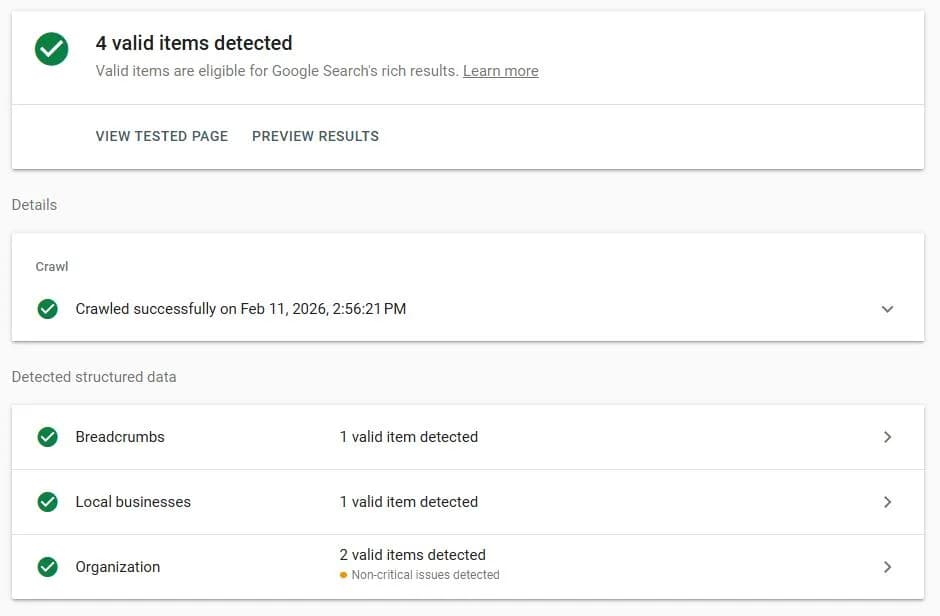
My site's homepage schema markup passes Google's validation with 4 valid items detected: Breadcrumbs, Local Business, and Organization schemas (Organization appears twice because both my main Organization schema and LocalBusiness schema reference the same business entity—this is normal for service businesses).
The tool flags 2 "non-critical issues" for missing postal code and street address fields. I intentionally omit these because I work from home and don't want my residential address published online. Instead, I use service area targeting—listing Vancouver, North Vancouver, and West Vancouver as areas served. Google understands this is standard practice for service area businesses and doesn't penalize it. The "non-critical" label means these fields are optional, not required.
What matters is that required fields are present and properly formatted. Common issues that actually break rich results include missing required properties, incorrect datetime formats (dates need timezone info like 2026-02-11T09:00:00-08:00), and mismatched data between your visible content and schema markup. The validator catches these before they prevent your rich results from showing. My setup passes validation because city-level location (West Vancouver, BC) plus defined service areas is sufficient for local SEO—you don't need to expose your home address to rank well.
Need Help Adding Schema Markup?
Proper schema markup can increase your click-through rates by 30% or more. I implement structured data on every project—Article schema for blog posts, Local Business schema for service pages, Product schema for e-commerce, and FAQ schema for support pages. It's standard practice, not an optional extra.
Get Schema Markup Added