Check Your Website's Performance Score
See how fast your website loads and get specific recommendations to improve it.
What is Google Lighthouse?
Lighthouse is Google's open-source tool for measuring website quality. It runs automated audits on your site and generates a report with scores from 0-100 in four key areas.
Performance
How fast your pages load. Slow sites lose visitors and rank lower in Google.
Accessibility
How usable your site is for people with disabilities. Critical for compliance and user experience.
Best Practices
Security, HTTPS, console errors, and modern web standards. Shows technical health.
SEO
Basic search engine optimization checks. Helps Google understand and rank your content.
Why Your Score Matters
- Google uses page speed as a ranking factor. Faster sites rank higher in search results.
- 53% of mobile users abandon sites that take over 3 seconds to load. Speed directly impacts revenue.
- Better user experience = higher conversion rates. Fast sites build trust and credibility.
- Mobile performance is critical. Most traffic comes from phones—make sure your site works great on them.
What's My Score?

My site scores 99/100/100/100 on mobile across all four core metrics. But even at this level, Lighthouse still identifies potential optimizations. This illustrates an important principle: performance testing tools will always surface suggestions, regardless of your score.
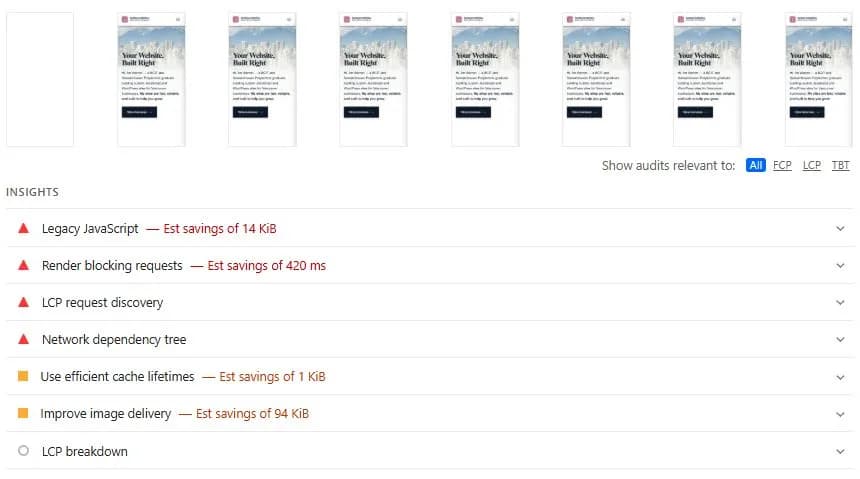
The current recommendations include saving 94 KB through better image delivery, eliminating 420ms of render-blocking resources, and removing 14 KB of legacy JavaScript polyfills. These are technically valid suggestions, but they represent what developers call "diminishing returns"—improvements that would require significant effort for minimal real-world impact.
Consider the trade-offs: The image savings come from serving smaller dimensions for responsive layouts, but this adds complexity to your build process. The render-blocking CSS warning targets essential above-the-fold styling—inlining it would bloat the HTML and hurt caching. The legacy JavaScript polyfills ensure compatibility with older browsers, a deliberate choice for broader accessibility.
At this level of optimization, chasing marginal improvements often means sacrificing maintainability, compatibility, or development velocity without meaningful benefit to visitors. A site that scores 100 while remaining practical to maintain beats one that's theoretically perfect but brittle and over-engineered.
It's also worth noting that performance scores can fluctuate based on server load, network conditions, and testing environment—a site scoring 100 one moment might drop to 99 the next, or vice versa. The metrics that matter most are the actual load times your real users experience.
Need Help Improving Your Score?
Low scores can mean lost revenue and poor search rankings. I build websites that consistently score 95+ across all four metrics—performance, accessibility, best practices, and SEO. Fast loading times, clean code, and technical optimization are standard on every project, not optional extras.
Get a Website Audit